
Manage multiple WhatsApp accounts
5, 10 or 30 WhatsApp accounts. One phone. One PC.
Your shop number, your support number and every staff WhatsApp, in one list. See who is waiting for a reply, answer from one screen, and stop carrying a phone for each number.
- Start with 2 accounts on your phone, no payment and no sign-up
- Staff keep their phones. They scan one QR code.
- Official WhatsApp linked devices. No cloned or modified app.
Trusted by 3,500+ businesses. Made by WappBlaster.
The problem
Why it is hard to manage multiple WhatsApp accounts
If two of these sound like your week, this page is for you.
A drawer full of phones
One phone for each number. You charge them, carry them and still miss the one that rang.
Customers wait, you find out late
A staff member forgets to reply. You learn about it when the customer has already bought elsewhere.
Staff leave, chats leave with them
Leads and follow-ups sit in a personal phone. When that person goes, the history goes too.
Risky workarounds
Cloned apps and modified WhatsApp builds can get a number banned. Logging out and in wastes the day.
Before
9 phones, 65 unread chats
- A phone to charge and carry for each number
- Unread chats that nobody sees in time
- No way to know which staff member replied
After, with StaffPeek
1 phone, 1 PC, every number
- Every number by name, in one list
- Unread count on each account, at a glance
- Reply from your phone or from your PC
What you get
Manage multiple WhatsApp accounts on your phone and your PC
Two apps, one job: every number in front of you.
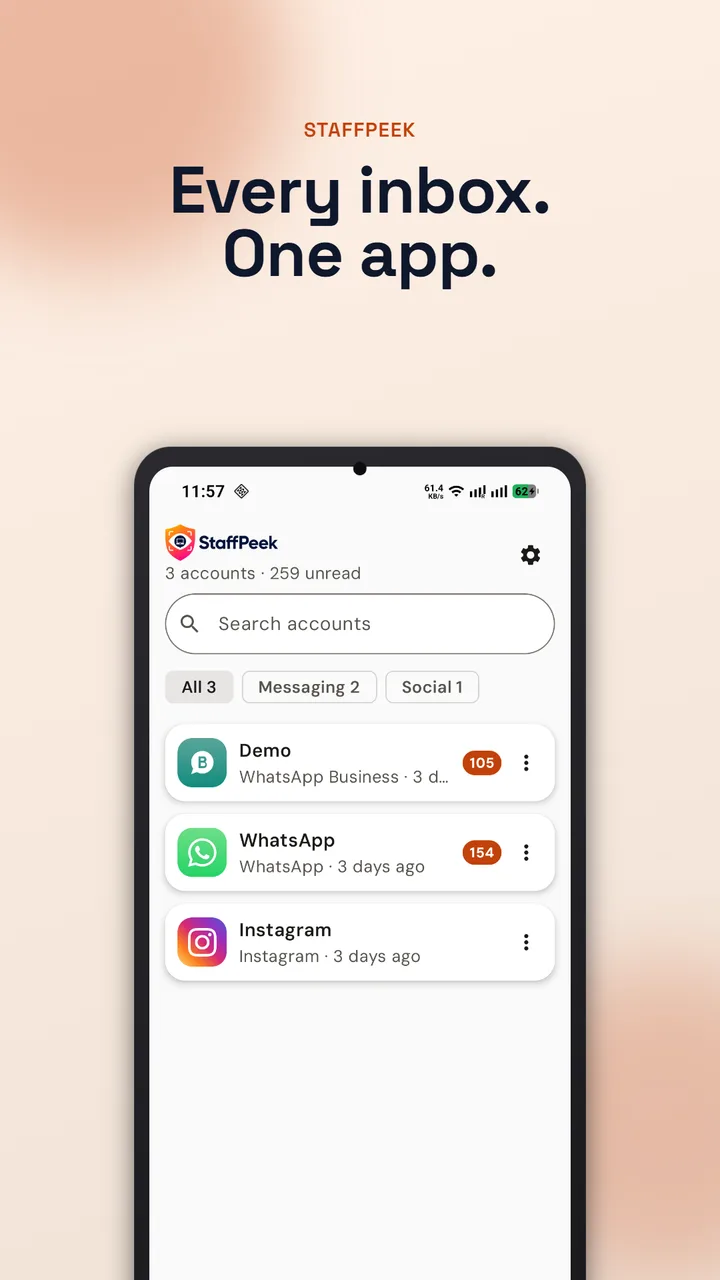
On your phone
For owners with many numbers
- Up to 200 accounts on one Android phone
- WhatsApp and WhatsApp Business, plus Telegram, Instagram and Gmail
- Unread count on every number
- Link a number on the same phone with a code
On your PC
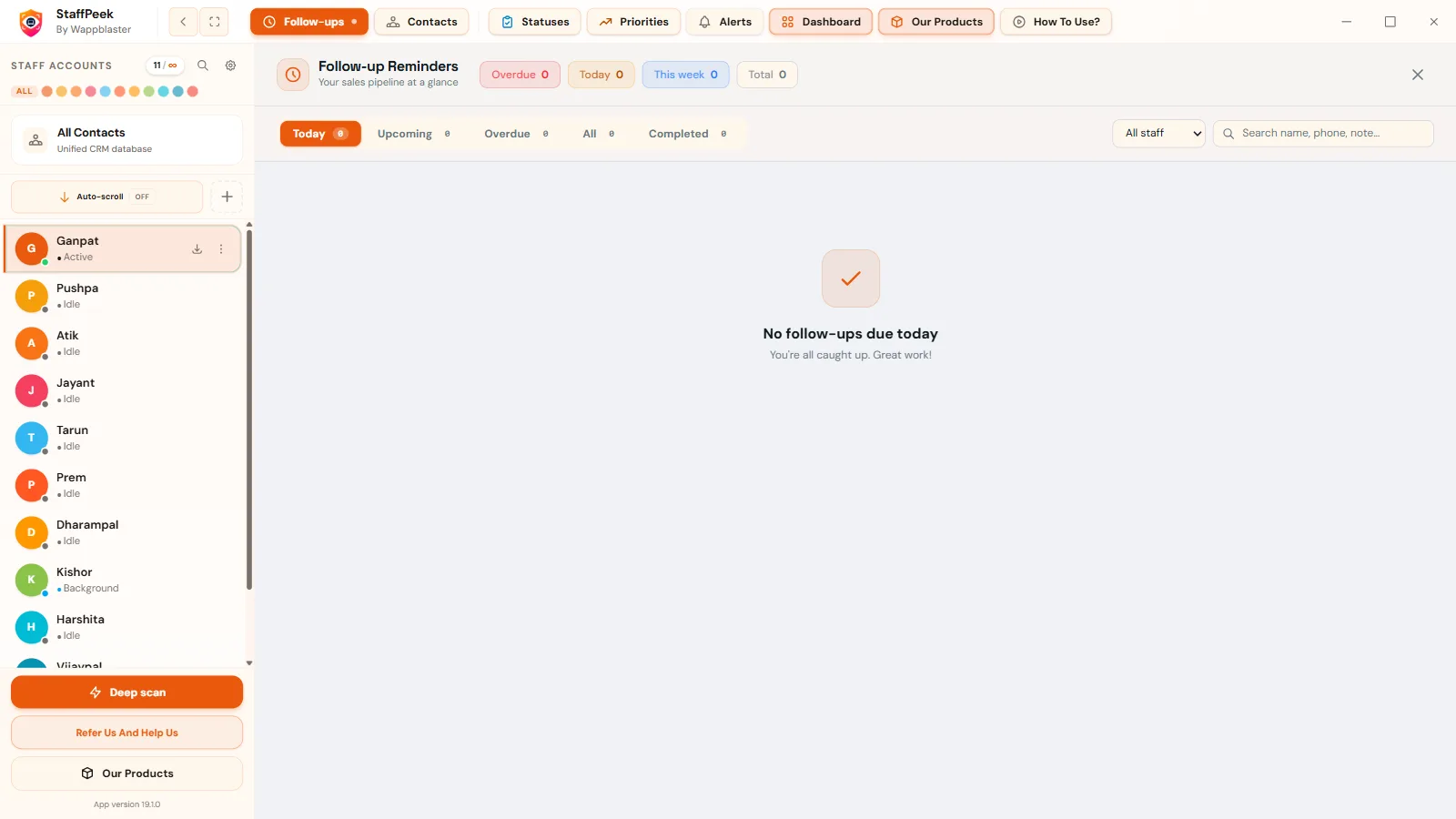
For managers with a team
- Unlimited staff WhatsApp accounts on one licensed PC
- Switch between staff numbers in a click
- Follow-up reminders and lead statuses for every chat
- Windows 10, Windows 11 and Mac
How to manage multiple WhatsApp accounts in 3 steps
About 2 minutes for each number.
- 1
Install
Get the Android app from Google Play, or the desktop app for Windows or Mac.
- 2
Scan each number
Open WhatsApp on the number's phone, tap Linked devices and scan the code StaffPeek shows.
- 3
Name it and go
Call it Shop, Support or Rahul. Every number now sits in one list with its unread chats.
Price to manage multiple WhatsApp accounts
One yearly price. No charge per staff member, per number or per message.
- Android app
- ₹1,500 + taxes /yr
- first 2 accounts at no charge
- Desktop app
- ₹2,200 + taxes /yr
- per PC · $30 + taxes abroad
- Both together
- ₹3,200 + taxes /yr
- Android + 1 PC
What StaffPeek does not do
- No bulk or broadcast messages
- No hidden reading: staff see it under Linked devices
- No iPhone app yet
- It cannot register a new WhatsApp number
Talk to us
Tell us how many WhatsApp accounts you manage
We reply on WhatsApp with the right setup for your numbers and help you link the first ones.
Manage multiple WhatsApp accounts: FAQ
How do I manage multiple WhatsApp accounts from one phone?
- Install StaffPeek on an Android phone, add WhatsApp once for each number and scan each number's QR code. All numbers then show in one list with their unread chats.
Can I see 10, 20 or 30 WhatsApp accounts on one PC?
- Yes. One StaffPeek desktop licence holds unlimited staff WhatsApp accounts on that computer. How many stay live at the same moment depends on the computer's memory.
Do my staff need to give me their phones?
- No. Each staff member keeps the phone and scans one QR code. StaffPeek joins as a linked device, the same way WhatsApp Web does, and staff can see it in their Linked devices list.
Will WhatsApp ban my numbers?
- StaffPeek uses WhatsApp's own linked-devices feature and does not change WhatsApp. It sends no bulk messages. WhatsApp's normal rules for each number still apply.
What does it cost?
- The Android app opens 2 accounts with no payment, then costs ₹1,500 + taxes per year. The desktop app is ₹2,200 + taxes per PC per year in India ($30 + taxes abroad). Both together are ₹3,200 + taxes per year.
Can StaffPeek read or store my chats?
- No. Chats travel between your device and WhatsApp. On desktop they stay on your computer, and on Android they stay inside each account's session on the phone.
Is there an iPhone app?
- Not yet. On iPhone, use the desktop app on a Windows or Mac computer.
Put every WhatsApp account on one screen today
Install, scan your first two numbers and see them side by side in minutes.
StaffPeek is an independent app by WappBlaster, not affiliated with WhatsApp LLC or Meta.