
Multiple accounts app
Multiple Accounts App for Android Is StaffPeek, Every Login Kept Separate
A multiple accounts app is a phone app that keeps 2 or more logins of one service open together, so logging out and in stops. StaffPeek gives every account its own private session on your Android phone and shows all of them in one list.
- 2 accounts with no sign-up
- 27 services, from WhatsApp to Gmail
- Android 8.0 and later
Updated 25 November 2026
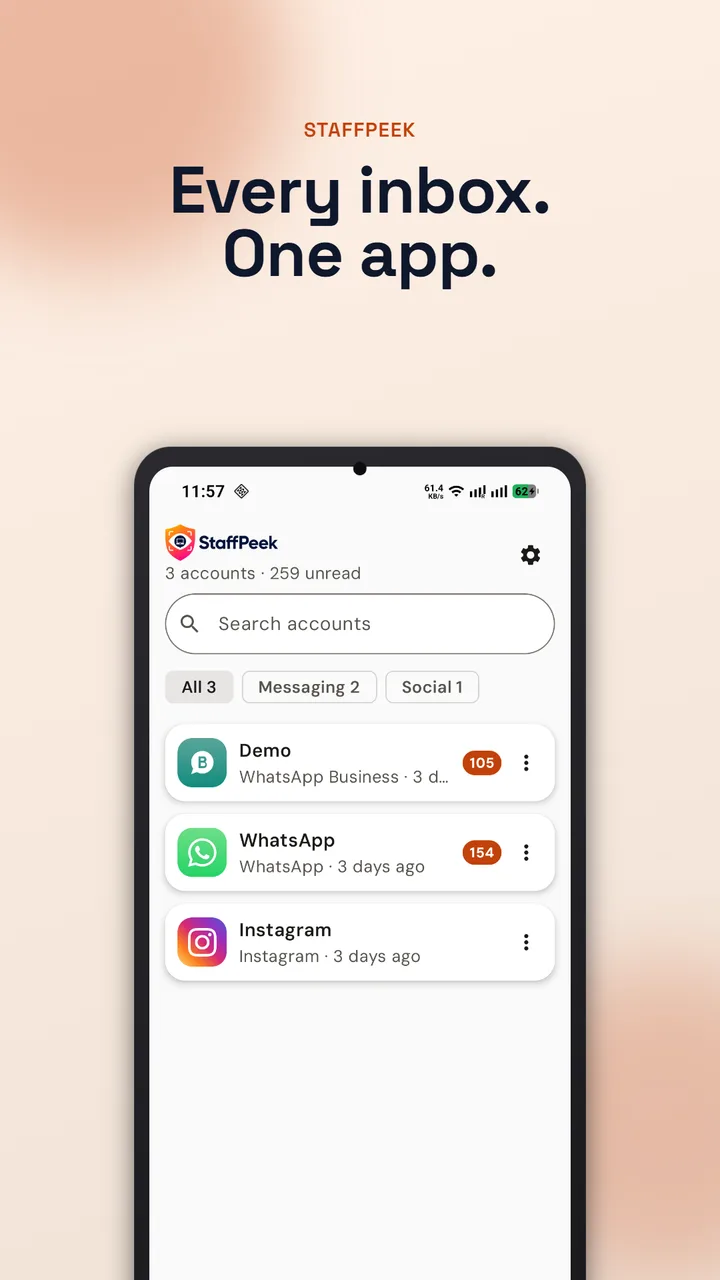
What is a multiple accounts app?
A multiple accounts app lets one phone stay signed in to several accounts of the same chat, social or mail service at the same time.
StaffPeek does this on Android with a separate session for each account, so one login never signs out another.
- You add the same service as many times as you have accounts.
- Each account keeps its own cookies, storage and login.
- Logins and chats stay on the phone. StaffPeek does not receive them.
Multiple accounts app for Android: how StaffPeek works
StaffPeek is a multiple accounts app for Android made by WappBlaster. It opens the web version of each service inside its own isolated session, so 3 WhatsApp numbers, 2 Instagram profiles and a work Gmail can all stay signed in on one phone. The app does not copy or change the original apps. The home list shows every account with its unread count, a search box and filters for messaging, social, mail and work. The app lists 27 services and also takes any website with a login through the Custom website option. The first 2 accounts work with no sign-up, and one phone holds up to 200 accounts. Each account uses 50 to 300 MB of storage. StaffPeek runs on Android 8.0 and later, and the Google Play listing went live in November 2026. Logins, chats and files stay inside each session on the phone and are left out of cloud backup.
Multiple accounts app benefits
One list for every inbox
See all accounts and their unread counts on one screen, then open the one you need.
Same service, many accounts
Add WhatsApp, Instagram or Gmail again for each number or profile you own.
Separate sessions
Accounts cannot see each other, and one login never signs out another.
Notifications from connected accounts
Turn on Keep accounts connected to get new message alerts from your most recent accounts.
Logins stay on the phone
StaffPeek does not receive your messages, and nothing goes into cloud backup.
Multiple accounts app setup: add your first account
Setup takes about 2 minutes for each account. You need the login of the account you want to add.
Install StaffPeek
Open Google Play on your Android phone and install StaffPeek.
Tap Add account
Open the app and tap Add account. The app shows the services by type.
Choose the service
Tap the service, for example Instagram. Use Custom website for a service that is not in the list.
Name the account
Give the account a name such as Personal, Shop or Support.
Sign in
Sign in on the page that opens. The account stays signed in from now on.
Add the next account
Tap Add account again and choose the same service for your second login.
Multiple accounts app screenshots
Four real screens from StaffPeek for Android.
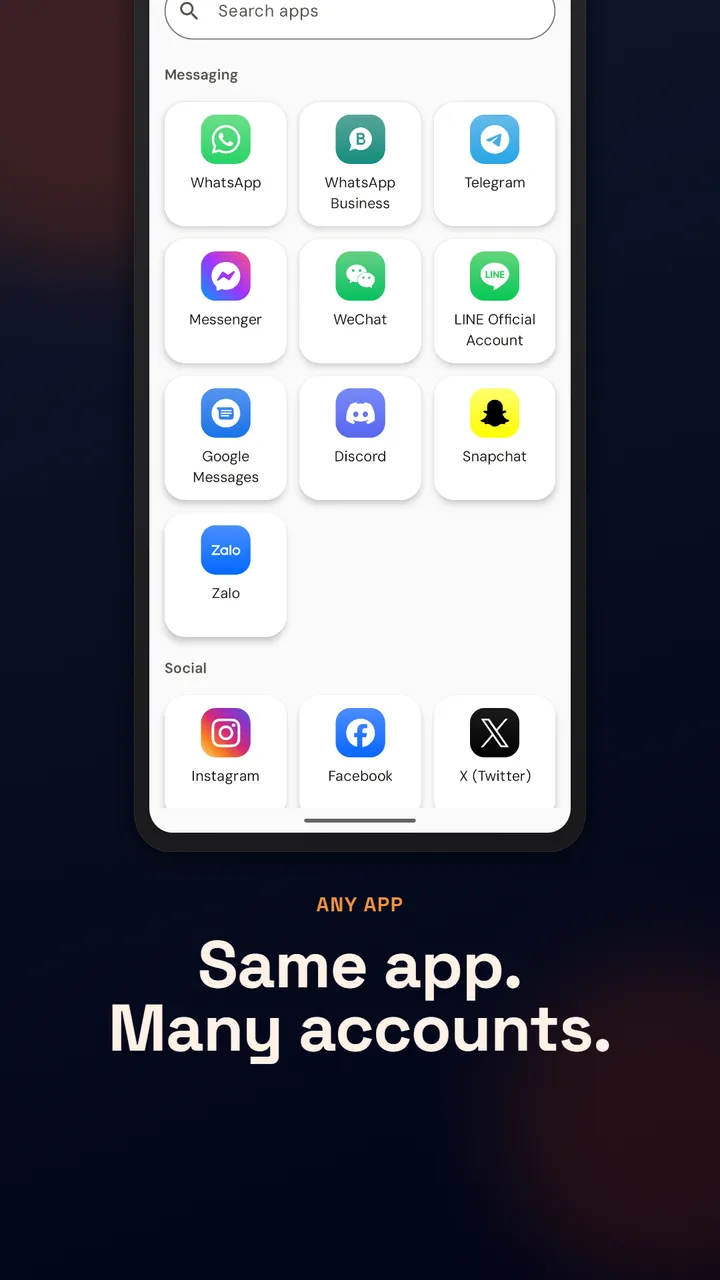
Add account: pick a service, then add it again for the next login. 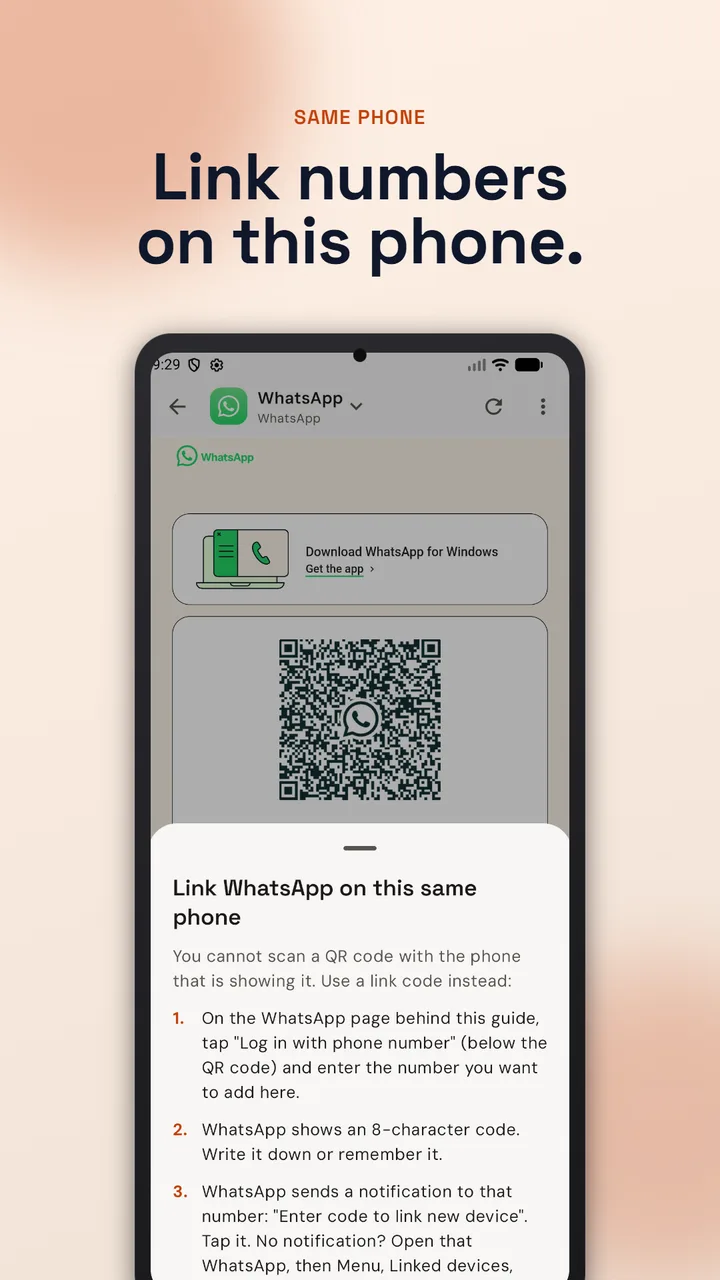
A step guide links a number held by this very phone. 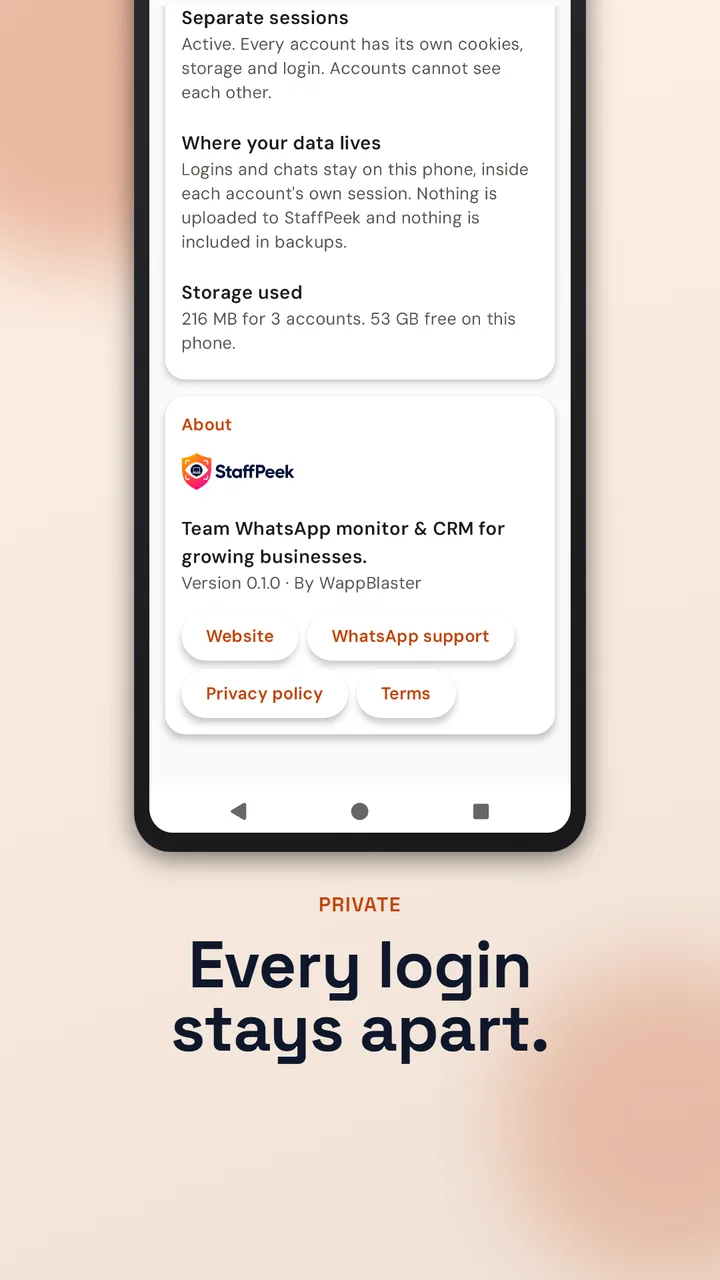
Settings: separate sessions, and the storage each account uses.
Multiple accounts app video: a 14 second tour
A short silent tour of the four main screens.
Multiple accounts app vs app cloner vs second phone
Three ways to use more than one account, compared on what matters day to day.
StaffPeek
- How it works
- Opens the web version of each service in its own session
- Accounts of one service
- As many as you add, up to 200 in total
- Services with no web version
- Not supported
- Where logins stay
- On your phone, one session for each account
- One list of all inboxes
- Yes, with unread counts
- Best for
- Many accounts across chat, social and mail
App cloner
- How it works
- Makes a copy of the installed app
- Accounts of one service
- Usually 1 extra copy for each clone
- Services with no web version
- Supported
- Where logins stay
- On your phone, inside the cloned app
- One list of all inboxes
- No, each clone is its own icon
- Best for
- One extra copy of an app that has no web version
Second phone
- How it works
- A full second device and SIM
- Accounts of one service
- 1 more for each phone
- Services with no web version
- Supported
- Where logins stay
- On the second phone
- One list of all inboxes
- No
- Best for
- Full calls and a separate number in your pocket
Multiple accounts app limits: when to choose something else
StaffPeek is not the right tool for every case. Read these limits before you install.
- StaffPeek opens the web version of each service. A feature that exists only in the service's own app is not available.
- For WhatsApp, each number must already have WhatsApp on a phone. StaffPeek links to that number and does not register a new one.
- There is no iPhone version. For a computer, use the StaffPeek desktop app for Windows and Mac.
- Accounts are not in cloud backup. On a new phone you add each account again.
- Each account uses 50 to 300 MB. A phone with little storage holds fewer accounts.
- Background alerts cover your most recently used accounts and use more battery. Other accounts update when you open them.
Multiple accounts app example: one shop, five logins
This is an illustration, not a customer story. Meera runs a clothing shop in Jaipur. She has a shop WhatsApp Business number, a support number, her own WhatsApp, the shop Instagram and a work Gmail. Before, she carried 2 phones and logged in and out of Instagram. With a multiple accounts app she adds the 5 logins once. Each morning she opens one list, sees 40 unread chats across 3 numbers, and answers the support number first.
Multiple accounts app price
The first 2 accounts need no payment and no sign-up. For more accounts, the Android plan costs ₹1,500 + taxes per year. The Android app together with the desktop app costs ₹3,000 + taxes per year.
Multiple accounts app FAQ
Which multiple accounts app works with WhatsApp, Instagram and Gmail together?
- StaffPeek for Android does. You add each service as many times as you have accounts, and all of them appear in one list with unread counts.
What is StaffPeek?
- StaffPeek is a multiple accounts app for Android that keeps every login in its own session. WappBlaster makes it, and it also has a desktop app for Windows and Mac.
How much does a multiple accounts app cost with StaffPeek?
- The first 2 accounts need no payment and no sign-up. For more accounts, the Android plan costs ₹1,500 + taxes per year. The Android app together with the desktop app costs ₹3,000 + taxes per year.
What is the best app for multiple accounts?
- It depends on the job. For many chat, social and mail accounts in one list, a session app such as StaffPeek fits. For an app with no web version, an app cloner fits better.
How to have two accounts on one app?
- First check the app's own settings, because some apps let you add a second account. If the app does not, add the service 2 times in StaffPeek and sign in to each account once.
How do I have two accounts on my Android device?
- Install StaffPeek from Google Play. Tap Add account, choose the service and sign in. Then tap Add account again for the second login. Both stay signed in.
Does StaffPeek clone or change my apps?
- No. StaffPeek does not copy, change or replace any app. It opens the web version of each service in a separate session on your phone.
How many accounts can I add to StaffPeek?
- One phone holds up to 200 accounts. The first 2 need no sign-up. Storage is the real limit, because each account uses 50 to 300 MB.
Is a multiple accounts app safe to use?
- Check what the app collects. StaffPeek keeps logins, chats and files inside each session on your phone. It has no ads and no third-party tracking tools, and it does not read your messages.
Will I get notifications from every account?
- Turn on Keep accounts connected in Settings. Your most recently used accounts then stay online and send new message alerts. Other accounts update when you open them.
Is there a multiple accounts app for PC?
- Yes. StaffPeek has a desktop app for Windows 10, Windows 11 and Mac. It is built for managers who open many staff WhatsApp accounts on one computer.
What happens to my accounts when I change phones?
- Accounts do not move, because StaffPeek leaves them out of cloud backup. Install StaffPeek on the new phone and add each account again.
Is StaffPeek part of WhatsApp, Meta or Google?
- No. StaffPeek is an independent app by WappBlaster. WhatsApp, Meta, Telegram, Google and the other services do not sponsor or endorse it.
Read next
- Dual WhatsApp appTwo or more WhatsApp numbers on one Android phone.
- Download StaffPeekAndroid, Windows and Mac downloads in one place.
- Multiple WhatsApp accounts on desktopThe guide for managers who work on a computer.
StaffPeek is an independent app by WappBlaster. It is not affiliated with, endorsed by or sponsored by WhatsApp LLC, Meta, Telegram, Google or any other service it works with. All product names belong to their owners.