
3 WhatsApp in one phone
3 WhatsApp in One Phone on Android With StaffPeek, and More
Running 3 WhatsApp in one phone means one handset shows the chats of three different WhatsApp numbers, so you stop carrying three phones for three numbers. StaffPeek holds the third number, and the fourth and fifth, as linked devices in one Android list.
- Third, fourth and fifth numbers
- Mix WhatsApp and WhatsApp Business
- No modified WhatsApp
Updated 25 November 2026
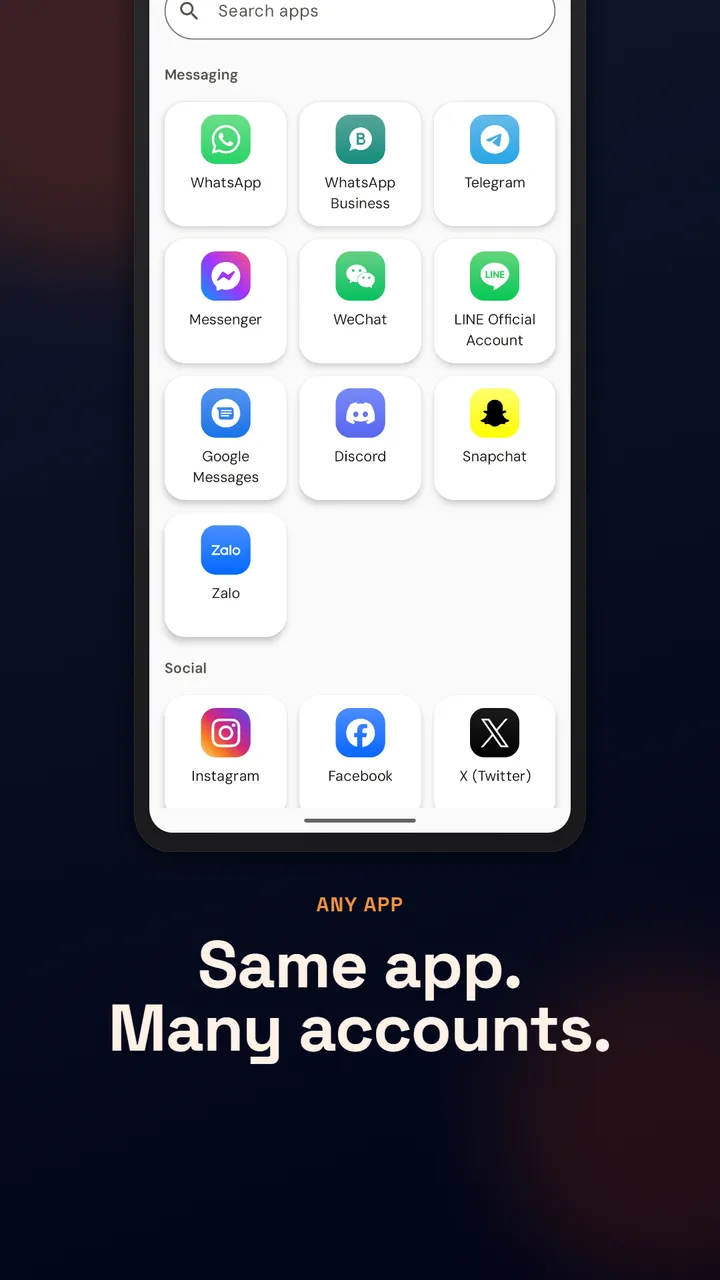
What is 3 WhatsApp in one phone, and is it possible?
It means three WhatsApp numbers readable on a single handset. Yes: WhatsApp's apps cover two on many Android phones, and linked devices add more.
StaffPeek is one such app: the third number joins as a linked device, with its own row and unread count.
- Numbers one and two can stay in WhatsApp's own apps.
- Number three and later go into StaffPeek.
- Every number needs WhatsApp on some main phone first.
3 WhatsApp in one phone: the StaffPeek method
The usual route to a third WhatsApp number used to be a modified app or a cloning tool, both of which put the account at risk. A cleaner route now exists because WhatsApp supports linked devices. Keep your first two numbers in WhatsApp and WhatsApp Business on the phone. For the third number, open StaffPeek, add WhatsApp and link the number either by scanning from the phone that holds its SIM or by the 8-character phone-number code. StaffPeek keeps that number in an isolated session, so its chats, contacts and media never touch the other two. The fourth and fifth numbers follow the same steps. WhatsApp's own rules still hold for each number: at most 4 linked devices, and the phone with the SIM has to connect within every 14-day window.
3 WhatsApp in one phone benefits
No risky mods
Use official WhatsApp and linked devices, not a patched app.
Room to grow
Number four or six uses the same steps as number three.
Chats stay separate
Each number has its own session and contact list.
Badge per number
See at once which of the three numbers needs a reply.
Keeps your current setup
Numbers one and two can stay exactly where they are.
3 WhatsApp in one phone: add the third number
Keep the phone or SIM that holds the third number close for the first link.
Keep numbers one and two
Leave your first two numbers in WhatsApp and WhatsApp Business as they are.
Open StaffPeek
Open Add account and select the WhatsApp type that number three uses.
Link it
Link by QR scan from the SIM's own phone, or by the phone-number code on this phone.
Label it
Name the row, for example Number 3 or Delivery.
Add more
Repeat for a fourth or fifth number.
3 WhatsApp in one phone screenshots
What extra WhatsApp numbers look like in StaffPeek.
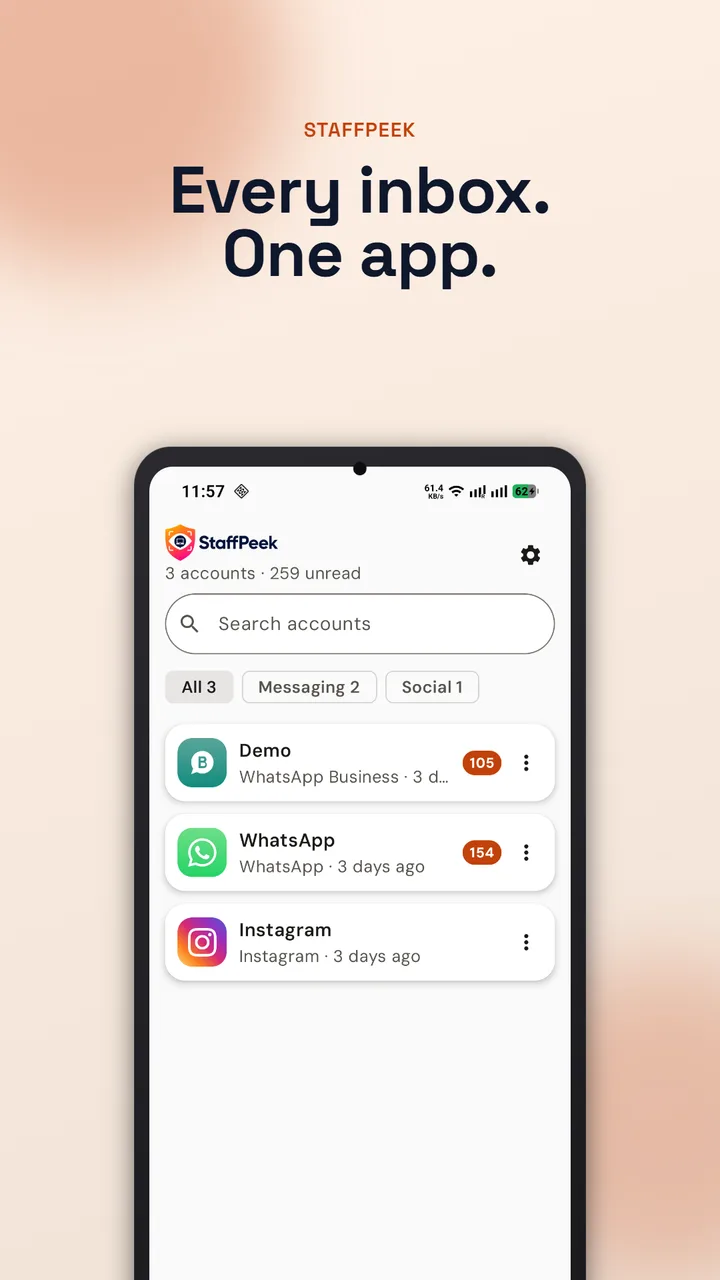
Each WhatsApp number shows its own unread count. 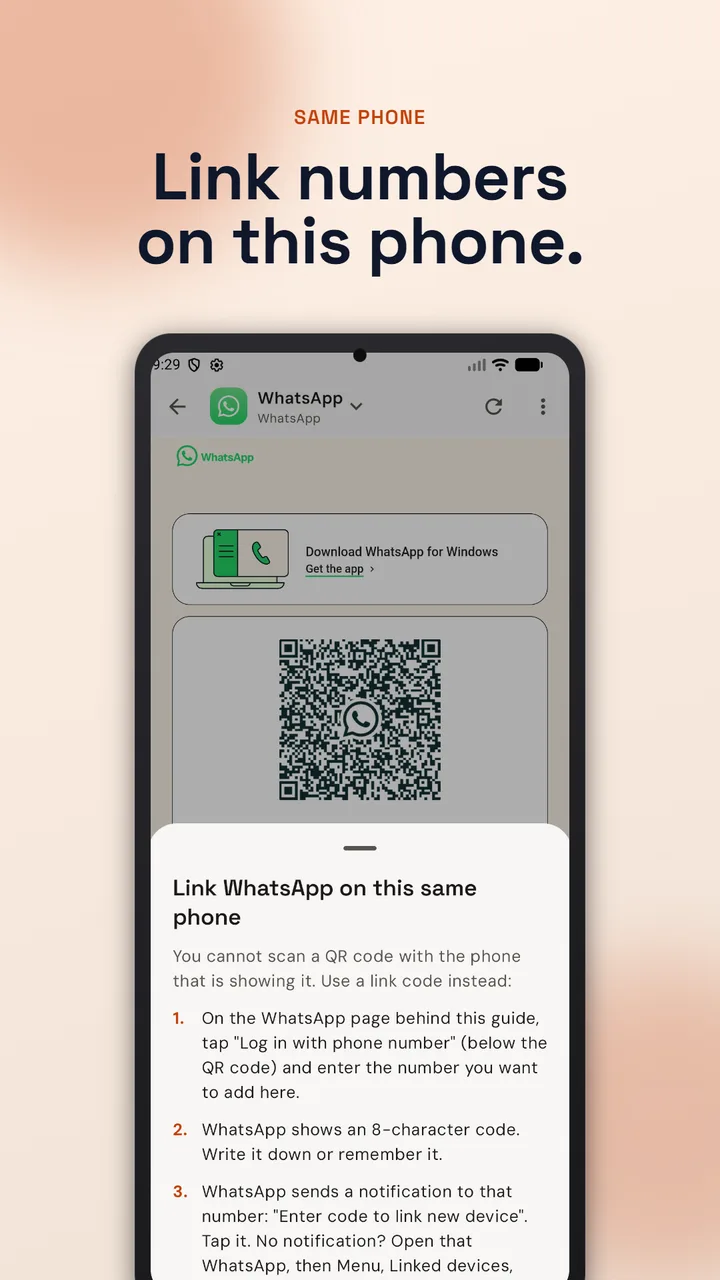
The code guide links a number held on the same phone.
3 WhatsApp in one phone: methods compared
Common ways people try to run a third number.
StaffPeek linked device
- Uses official WhatsApp
- Yes
- Risk to the account
- Low, a standard WhatsApp feature
- Numbers beyond three
- Yes
- Features
- WhatsApp Web's set
- Best for
- Businesses that need a safe third number
Modified WhatsApp APK
- Uses official WhatsApp
- No
- Risk to the account
- High, WhatsApp bans unofficial apps
- Numbers beyond three
- Varies
- Features
- Varies
- Best for
- Not recommended
App cloner
- Uses official WhatsApp
- Copies the official app
- Risk to the account
- Depends on the cloner
- Numbers beyond three
- Varies
- Features
- Full app
- Best for
- One extra copy on some phones
3 WhatsApp in one phone limits
These WhatsApp rules still apply to the third number.
- Number three must be registered in WhatsApp somewhere before StaffPeek can link it.
- A spare phone that holds the third number should get online at least every two weeks, or WhatsApp unlinks StaffPeek.
- WhatsApp Web features apply to the third number, not every phone-app feature.
- Each number allows 4 linked devices; StaffPeek uses one.
3 WhatsApp in one phone example: a travel agent
This is an illustration, not a customer story. Joseph runs a travel desk in Goa with 3 numbers: his own, a WhatsApp Business number for bookings, and a number for hotel partners on a second phone. He keeps his own and the bookings number in the WhatsApp apps, and links the hotel number to StaffPeek. During peak season he answers all 3 from one phone while the second phone stays charged at the office.
3 WhatsApp in one phone price
If the third number is the only account you add to StaffPeek, there is no charge, because the first 2 accounts are covered. Once StaffPeek itself carries three of your numbers, you pay ₹1,500 and taxes per Android year, or ₹3,000 and taxes per year with the desktop app.
3 WhatsApp in one phone FAQ
Which app runs 3 WhatsApp in one phone safely?
- StaffPeek runs the third number as an official WhatsApp linked device, so no modified app is needed.
Is StaffPeek an app for 3 WhatsApp in one phone?
- Yes. StaffPeek is an Android app that adds a third, fourth or later WhatsApp number to one phone, each in its own session.
How much does 3 WhatsApp in one phone cost with StaffPeek?
- StaffPeek bills nothing for one or two numbers. Three numbers or more inside it cost ₹1,500 a year on Android only, or ₹3,000 a year with the computer app, taxes extra.
Is it possible to have multiple WhatsApp accounts on one phone?
- Yes. WhatsApp's own apps take two accounts on many Android phones, and linked devices in StaffPeek add more.
Can I have 3 WhatsApp on my iPhone?
- StaffPeek is Android only. On iPhone, the limit is whatever WhatsApp's own app allows.
How to run 4 WhatsApp in one phone?
- Keep two numbers in WhatsApp's apps and link numbers three and four to StaffPeek, one row each.
Will WhatsApp ban my third number?
- Linked devices are an official WhatsApp feature. Bans come from modified apps and spam, not from linking a device.
Does the third number need its own SIM?
- It needs WhatsApp set up on some phone. That phone can be a cheap spare that stays at home or the office.
Can the third number be WhatsApp Business?
- Yes. Choose WhatsApp Business in StaffPeek when you add it.
Can I reply from the third number when its phone is off?
- Yes, for a while. WhatsApp drops the link if that phone has no internet for 14 straight days.
Read next
- Dual WhatsApp appStart with two numbers.
- Multiple WhatsApp Business accountsMany branch numbers for owners.
- Link with phone numberThe no-scan method.
StaffPeek is an independent app by WappBlaster. It is not affiliated with, endorsed by or sponsored by WhatsApp LLC, Meta, Telegram, Google or any other service it works with. All product names belong to their owners.